
Download 7taps – microlearning platform, AI‑powered corporate training, short lessons
Overview of 7taps Microlearning Platform
7taps is a purpose‑built microlearning platform that reimagines corporate training by delivering bite‑sized lessons that can be completed in the time it takes to brew a coffee or ride the elevator. The core philosophy—learning in moments—means that every lesson is intentionally short, typically ranging from 60 to 180 seconds, yet packed with the essential information needed to reinforce a concept or skill. By converting traditional, hour‑long courses into a series of focused micro‑modules, 7taps helps organizations combat knowledge decay, improve retention, and keep employees engaged in a world where attention spans are constantly challenged.
What truly sets 7taps apart is its AI‑driven content engine. Users upload existing training material—PDFs, PowerPoint decks, videos, or even long‑form documents—and the platform automatically extracts key points, creates concise learning nuggets, and suggests interactive quizzes to reinforce each segment. This reduces the time spent on instructional design from weeks to a matter of hours, allowing learning teams to focus on strategy rather than manual content chopping.
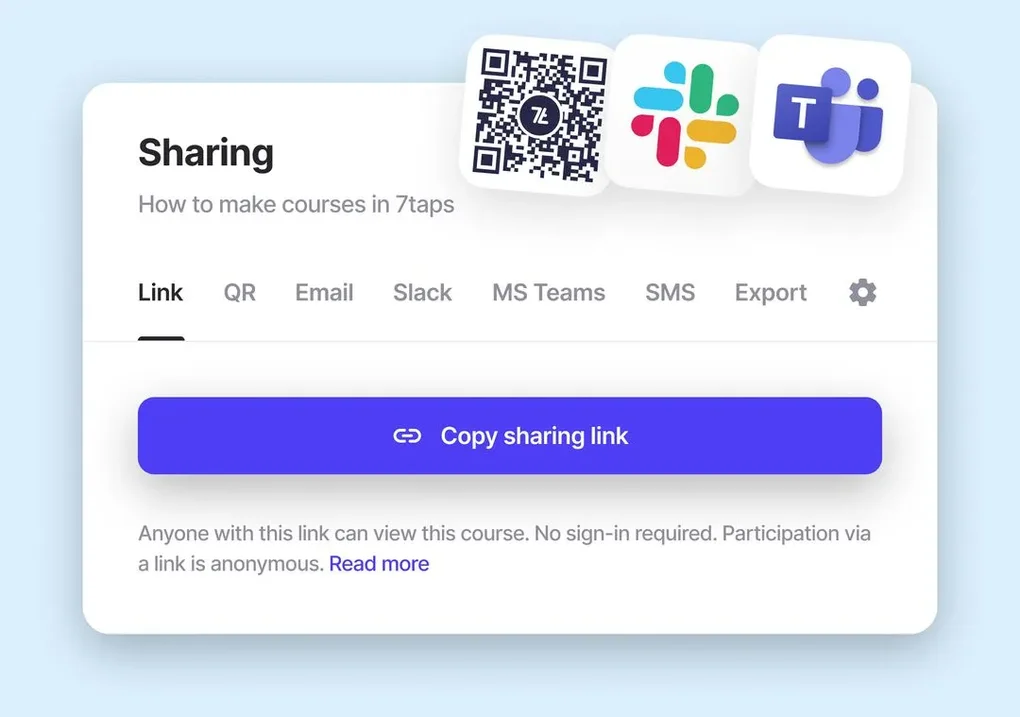
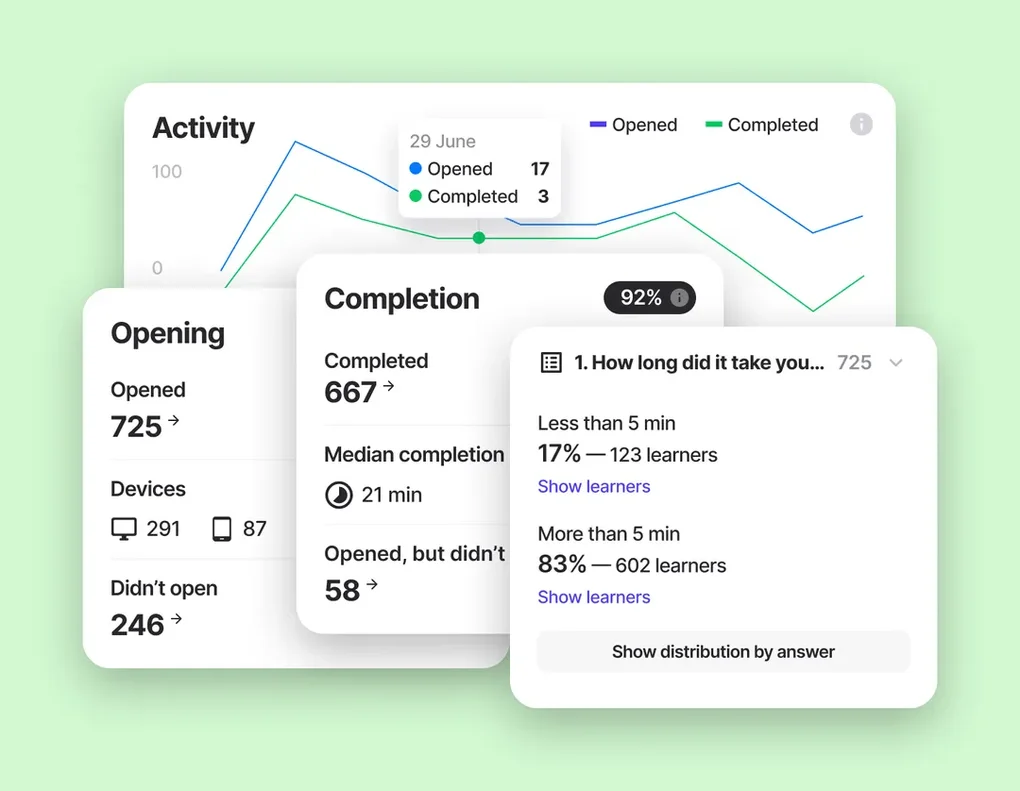
Distribution is another strength. 7taps lessons can be shared via email, QR codes, SMS, Microsoft Teams, Slack, or embedded directly into intranet pages and LMS portals. Because the platform is browser‑based, learners do not need to install a dedicated app or remember extra login credentials; a single click opens the lesson in a secure, responsive interface that adapts to desktops, tablets, and smartphones. Real‑time analytics provide administrators with dashboards that highlight completion rates, quiz scores, and engagement heatmaps, making it easy to identify knowledge gaps and iterate on content quickly.
Integration with existing Learning Management Systems (LMS) is seamless. 7taps supports LTI, xAPI, and SCORM, enabling organizations to synchronize learner data, generate combined reports, and maintain a single source of truth for compliance and certification tracking. Whether you’re onboarding new hires, delivering mandatory compliance updates, or fostering continuous professional development, 7taps offers a flexible, cost‑effective solution that aligns with modern, mobile‑first learning strategies.
Key Features, Pros and Cons
- AI‑driven microlearning engine that automatically transforms long‑form content into short, digestible lessons.
- Library of industry‑tested templates for compliance, onboarding, product knowledge, and soft‑skill development.
- Multi‑channel distribution: email, QR code, SMS, Microsoft Teams, Slack, and embeddable SCORM modules.
- No‑login, no‑download learner experience, reducing friction and boosting completion rates.
- Real‑time analytics dashboard with progress tracking, quiz scores, and engagement heatmaps.
- Full LMS integration via LTI, xAPI, and SCORM for centralized reporting and data sync.
- Collaborative authoring with version control, role‑based permissions, and content approval workflows.
- Secure cloud hosting with ISO‑27001 alignment, GDPR and CCPA compliance, and AES‑256 encryption.
Pros
- Rapid content creation thanks to AI assistance, cutting development time by up to 70%.
- Short, mobile‑friendly lessons increase learner engagement and knowledge retention.
- Flexible sharing options eliminate the need for a dedicated mobile app.
- Deep, real‑time analytics enable data‑driven improvements to training programs.
- Seamless LMS integration reduces duplication of effort and maintains compliance records.
Cons
- Free tier limits branding customization and the number of active micro‑courses.
- Advanced analytics and premium templates require a paid subscription.
- AI‑generated suggestions may need manual refinement for highly technical or regulated topics.
- Initial setup for large content libraries can be time‑intensive.
- Organizations that prefer long‑form, instructor‑led courses may find the microlearning focus restrictive.
Installation, Usage, Compatibility & Frequently Asked Questions
Installation & Setup
7taps is a cloud‑based SaaS solution, so there is no software to install on local machines. Getting started involves three straightforward steps:
- Sign up on the 7taps website using a corporate email address. The free tier provides up to five active micro‑courses and basic analytics.
- Create a workspace where administrators can invite content creators, reviewers, and managers. Role‑based permissions ensure that only authorized users can publish courses.
- Connect to your LMS (optional). Use the built‑in LTI or xAPI connectors to sync learner data with platforms such as Moodle, Cornerstone, or SAP SuccessFactors.
Usage Workflow
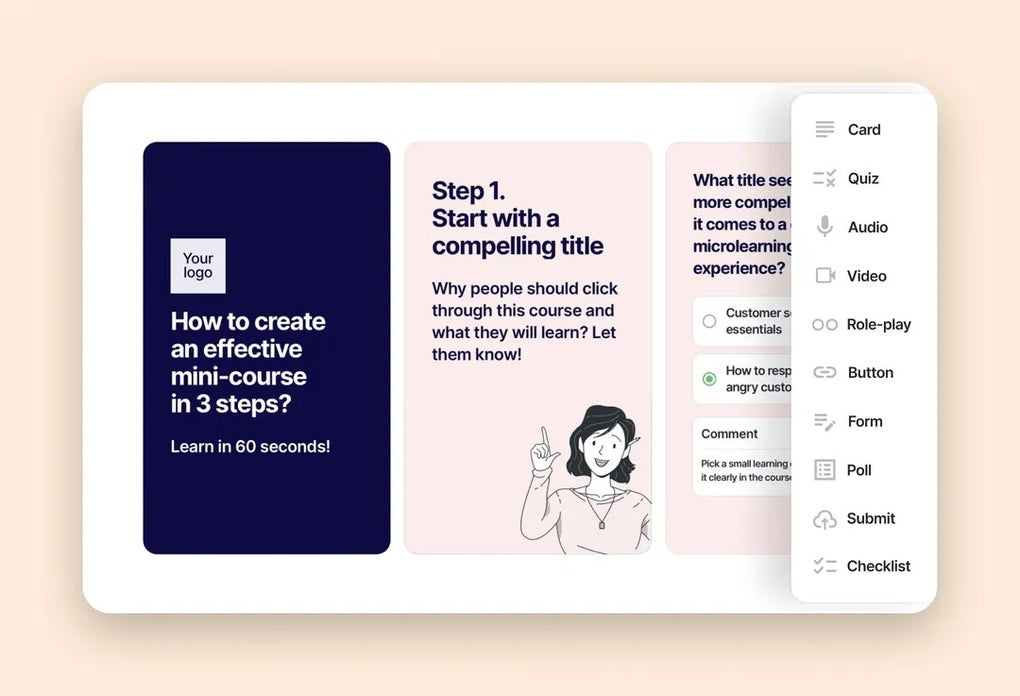
After logging in, the authoring interface guides users through a step‑by‑step wizard. Upload a source document (PDF, PowerPoint, or video), select a template, and let the AI suggest micro‑segments. Review and edit each segment, then add optional quiz questions.
Once satisfied, publish the mini‑course. Distribution options appear on the final screen; choose one or multiple channels and generate a shareable link, QR code, or embed code. Learners click the link, complete the lesson, and optionally take a short quiz.
Progress is logged automatically and displayed on the admin dashboard, where you can filter by department, date range, or performance metrics.
Compatibility
7taps works on any modern web browser—Chrome, Edge, Firefox, Safari—on Windows, macOS, Linux, as well as mobile browsers on Android and iOS. Because it is entirely web‑based, there is no need for separate desktop or mobile apps, and the platform automatically adapts to different screen sizes, ensuring a consistent experience across devices.
Frequently Asked Questions
Is there a free version of 7taps?
Yes. The free tier allows up to five active micro‑courses, basic analytics, and unlimited learner access. Advanced features such as custom branding and premium reporting require a paid subscription.
Can I integrate 7taps with my existing LMS?
Absolutely. 7taps supports LTI, xAPI, and SCORM, making it compatible with most major LMS platforms. Integration guides are available in the admin console.
How secure is learner data on 7taps?
7taps uses ISO‑27001‑aligned cloud infrastructure, encrypts data in transit (TLS) and at rest (AES‑256), and complies with GDPR and CCPA regulations.
Do I need technical skills to create micro‑courses?
No. The AI‑assisted authoring wizard walks you through content segmentation, template selection, and quiz creation. Minimal design or coding knowledge is required.
What support options are available?
Free users receive community forum access and email support with a 48‑hour response time. Paid plans include live chat, dedicated account managers, and priority ticket handling.
Expert Review
7taps delivers a modern, AI‑driven approach to corporate training that aligns perfectly with today’s fast‑paced work environments. The platform’s ability to transform existing content into bite‑sized lessons in minutes is a game‑changer for learning teams struggling with resource constraints. Multi‑channel distribution and a no‑login learner experience eliminate many of the friction points that cause low completion rates in traditional LMSs. While the free tier is generous, larger enterprises will likely need to upgrade for full branding control and advanced analytics. Overall, 7taps stands out as a secure, scalable, and user‑friendly solution that can accelerate learning outcomes while reducing administrative overhead.
- Pros: AI content creation, short lesson format, seamless LMS integration, robust analytics.
- Cons: Limited branding on free tier, advanced features behind a paywall, initial setup for large libraries.
Conclusion & Call to Action
In summary, 7taps provides a compelling blend of AI‑driven microlearning, flexible distribution, and powerful analytics—all without the overhead of a traditional LMS. Organizations looking to modernize onboarding, compliance training, or continuous skill development will appreciate the platform’s short‑lesson format that fits naturally into a busy workday. The free tier offers enough functionality to pilot the concept, while paid plans unlock branding, deeper insights, and enterprise‑grade support. The browser‑first approach guarantees universal accessibility across Windows, macOS, Android, and iOS devices, eliminating the need for separate app installations.
Ready to transform your corporate training into bite‑size, high‑impact learning? Download 7taps now, start your free trial, and experience the power of microlearning in just a few clicks.



.png)



